
ProLiant DL760 Generation 2 Server Maintenance and Service Guide

I/O Module Removal and Replacement Procedures
Hot-Plug Fans
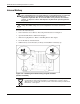
The ProLiant DL760 G2 server ships with two hot-plug fans. Fan 1 is closest to the rear of
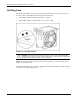
the server. Each fan has LEDs that indicate the status of the fan:
• Green LED (1)—Fan is installed and working properly.
• Amber LED (2)—The fan needs attention or is not ins talled.
Figure 6-17: Hot-plug fan LEDs
CAUTION: Never remove both hot-plug fans while the server is powered up. Overheating
and damage to the hardware could result. If the appropriate software drivers are installed, the
operating system software will initiate a power shutdown.
NOTE: The hot-plug fan LEDs are not part of the fan housing. Figure 6-17 shows the LEDs as if the
fan were installed in the server.
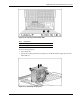
The ProLiant DL760 G2 server comes equipped with fan attention LEDs located on the front
of the server as shown in Figure 6-18.
6-18 HP ProLiant DL760 Generation 2 Server Maintenance and Service Guide