
ProLiant DL760 Generation 2 Server Maintenance and Service Guide

I/O Module Removal and Replacement Procedures
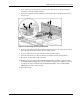
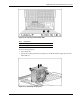
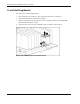
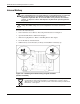
4. Press on the top of the appropriate expansion slot release lever (1) and open the lever
toward the rear of the expansion slot (2).
5. Unseat the expansion board by pulling up on the plastic tab (3) and lift the board out of
the server (4).
Figure 6-16: Removing an I/O expansion board
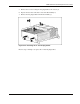
6. If you are only removing the board, install an expansion slot cover. Close the slot release
lever. Be sure that the lever latches into the closed position.
7. If you are replacing the board, install the new I/O expansion board.
8. Close the slot release lever. Be sure that the lever latches into the closed position.
9. Reconnect any I/O cables to the new board.
10. Return power to the slot through the PCI Hot Plug button or software application. The
green LED will flash during the power-up transition and will turn on when the power-up
is complete. For more information about PCI Hot Plug LEDs, refer to “PCI Hot Plug
LED Indicators” earli er in this chapter.
11. Close the I/O lid.
HP ProLiant DL760 Generation 2 Server Maintenance and Service Guide 6-17