
ProLiant DL760 Generation 2 Server Maintenance and Service Guide

I/O Module Removal and Replacement Procedures
PCI Hot Plug LED Indicators
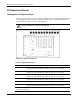
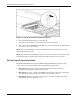
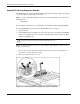
The PCI Hot Plug amber (1) and green (2) LEDs (shown in the following figure for one slot)
provide a visual reference of the status of each slot. The LEDs are viewed from the rear of the
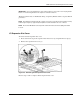
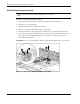
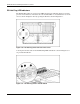
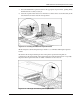
server as shown in Figure 6-10 or by opening the I/O lid as shown in Figure 6-11.
Figure 6-10: PCI Hot Plug LEDs from rear of the server
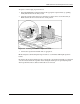
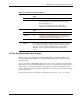
A description and slot status for the PCI Hot Plug LEDs and button as shown in Figure 6-11
are provided in Table 6-2.
Figure 6-11: PCI Hot Plug LEDs in the I/O module
6-12 HP ProLiant DL760 Generation 2 Server Maintenance and Service Guide