
ProLiant DL760 Generation 2 Server Maintenance and Service Guide
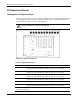
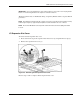

I/O Module Removal and Replacement Procedures
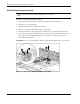
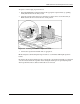
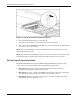
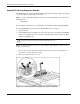
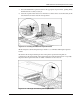
Figure 6-9: Full-length self-latching slot keeper feature
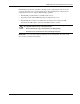
4. Close the I/O lid and slide the server into the rack.
5. Power up the server. Refer to “Pow ering Up the Server” in Chapter 2.
6. If necessary, run the ROM-Based Setup Utility, as described in the HP ProLiant DL760
Generation 2 Server User Guide.
NOTE: Refer to the HP QuickSpecs for the ProLiant DL760 G2 servers at www.hp.com for a list of
supported I/O expansion boards.
NOTE: Each PCI-X bus will automatically configure to run in the most advanced mode (PCI-X or PCI)
and the highest frequency supported by all expansion boards installed in the slots on the bus.
PCI Hot Plug I/O Expansion Boards
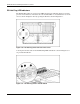
The ProLiant DL760 G2 server supports PCI Hot Plug. PCI Hot Plug and the operating
system of the server work together to allow the following hot-plug actions:
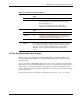
• Hot-replace—Allows you to replace a failed expansion board with an identical
expansion board without powering down the server.
• Hot-add—Allows you to install new PCI/PCI-X expansion boards in previously empty
slots without powering down the server under some operating systems.
• Hot-upgrade—Allows you to replace an expansion board with a different expansion
board without powering down the server.
6-10 HP ProLiant DL760 Generation 2 Server Maintenance and Service Guide