
ProLiant DL760 Generation 2 Server Maintenance and Service Guide

I/O Module Removal and Replacement Procedures
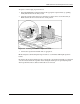
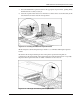
To replace a non-hot plug expansion board:
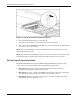
1. Insert the PCI/PCI-X expansion board into the appropriate expansion slot (1), pushing
firmly until the board is securely seated.
2. Close the expansion slot release lever from the rear of the unit to secure the board (2).
Make sure that the lever latches into the closed position.
Figure 6-8: Inserting the PCI/PCI-X expansion board
3. Connect the expansion board I/O cable as appropriate.
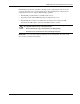
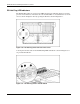
HP has designed a self-latching slot keeper feature to accommodate full-length expansion
boards.
Be sure that the V-shaped slot keeper tabs on the plastic expansion board guide are positioned
over the forward end of the expansion board. Using the slot keepers is especially important
when expansion boards are added or when the server is moved.
HP ProLiant DL760 Generation 2 Server Maintenance and Service Guide 6-9