
ProLiant DL760 Generation 2 Server Maintenance and Service Guide

I/O Module Removal and Replacement Procedures
Removing the I/O Module
To remove the I/O module::
1. Power down the server. Refer to “Powering Do wn the Server” in Chapter 2. If the server
is rack mounted, the cable management arm must be removed. Refer to “Removing the
Cable Management Arm” in this chapter.
2. Label and remove the cables from the back of the I/O module.
3. Open the I/O lid. Refer to “I/O Lid” in Chapter 3.
4. Loosen the security screw, if necessary. Refer to “Se curity Screw” in Chapter 5.
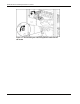
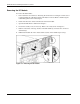
5. Push in on the sides of the stop latches on the I/O module (1) and rotate the cam levers
downward (2).
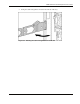
6. Pull the I/O module out of the chassis until it catches on the module stop latch (3).
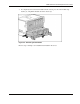
Figure 6-3: Releasing the I/O module
6-4 HP ProLiant DL760 Generation 2 Server Maintenance and Service Guide