
ProLiant DL760 Generation 2 Server Maintenance and Service Guide

Processor and Memory Module Removal and Replacement Procedures
HP ProLiant DL760 Generation 2 Server Maintenance and Service Guide
Memory Riser Board
To remove the memory riser board:
1. Remove the processor and memory module. Refer to “Removing t he Processor and
Memory Module” in this chapter.
2. Remove all of the memory cartridges. Refer to “Removing the Memory Cartridge” in this
chapter.
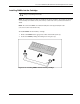
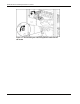
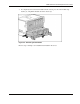
3. Push down the lever latch to release the memory riser board (1).
4. Pull up the memory riser board lever (2).
5. Slide the memory riser board up (3) and out (4) from the processor and memory module.
Figure 5-17: Removing the memory riser board
To install the memory riser board reverse steps 1 through 5.