
ProLiant DL760 Generation 2 Server Maintenance and Service Guide

Processor and Memory Module Removal and Replacement Procedures
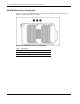
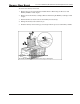
3. Rotate all of the DIMM socket levers inward prior to closing the cartridge cover.
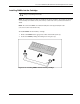
4. Close the memory cartridge cover.
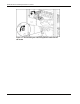
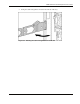
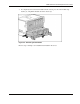
5. Insert the memory cartridge in the server and secure it in place by lifting the cartridge
ejector lever.
CAUTION: Inspect the memory cartridge for bent pins before reinstalling it. Do not “drop” the
cartridge into the cage.
6. Lock the memory cartridge in place by rotating the cartridge lock switch clockwise.
7. Verify the cartridge is online.
NOTE: Refer to the HP ProLiant DL760 Generation 2 Server User Guide, for more information on
installing DIMMs
5-16 HP ProLiant DL760 Generation 2 Server Maintenance and Service Guide