
ProLiant DL760 Generation 2 Server Maintenance and Service Guide

Processor and Memory Module Removal and Replacement Procedures
Installing DIMMs into the Cartridge
CAUTION: When handling a memory module, be careful not to touch any of the contacts.
Doing so may damage the module.
NOTE: Be sure that memory modules are installed in the proper orientation. The modules are keyed to
ensure that they are installed correctly in the memory socket. Refer to the system documentation for
details.
NOTE: Be sure that the DIMMs are installed in bank pairs and in proper bank pair order.
(1+2, then 3+4, then 5+6, and then 7+8).
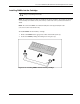
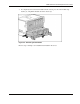
To install DIMMs into the memory cartridge:
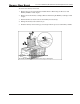
1. Slide each DIMM into the appropriate socket on the memory bus (1).
2. Secure the DIMM by lifting the locking levers into place (2).
Figure 5-16: Installing DIMMs into the memory cartridge
HP ProLiant DL760 Generation 2 Server Maintenance and Service Guide 5-15