
ProLiant DL760 Generation 2 Server Maintenance and Service Guide

Processor and Memory Module Removal and Replacement Procedures
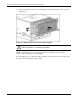
Opening the Memory Cartridge
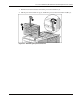
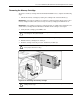
To gain access to the DIMMs, open the memory cartridge cover:
1. Squeeze the lock tabs together at the end of the cartridge opposite the lock lever (1).
2. Tilt the cartridge cover up until it latches in the up position to access the DIMMs (2).
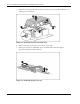
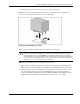
Figure 5-13: Opening the memory cartridge
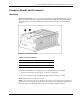
DIMM Overview
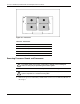
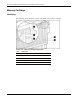
The ProLiant DL760 G2 server has four memory bank pairs, each consisting of 10 DIMMs
installed across the five memory cartridges. The server supports up to 40 GB of Hot Plug
RAID memory.
5-12 HP ProLiant DL760 Generation 2 Server Maintenance and Service Guide