
ProLiant DL760 Generation 2 Server Maintenance and Service Guide

Processor and Memory Module Removal and Replacement Procedures
Processor and Memory Module
WARNING: The processor and memory module weighs more than 16 kg (35 lbs). HP
recommends either removing ALL of the memory cartridges before handling the
module or having two people handling the module together.
CAUTION: Do not attempt to remove the processor and memory module while power is
applied to the system. The module is not hot-pluggable. Immediate system shutdown and
data loss will occur.
To remove the processor and memory module:
1. Power down the server. Refer to “Pow ering Down the Server” in Chapter 2.
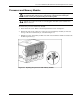
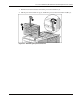
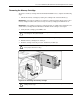
2. Push in the sides of the cam levers on the processor and memory module (1) and rotate
the top of the levers downward (2), as shown in Figure 5-3.
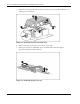
3. Pull the processor and memory module out of the chassis until the module encounters the
module stop latches (3).
Figure 5-3: Opening the processor and memory module
HP ProLiant DL760 Generation 2 Server Maintenance and Service Guide 5-3