
ProLiant DL760 Generation 2 Server Maintenance and Service Guide

5
Processor and Memory Module Removal and
Replacement Procedures
Shipping Screws
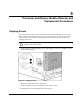
To prevent damage to the processor and memory module during shipping, the server ships
with a shipping screw installed on each side of the chassis. These screws must be removed
and the processor and memory module properly seated and secured in the chassis before
powering up the server.
CAUTION: To prevent damage to the processor and memory module during shipping, both
shipping screws must be installed.
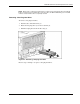
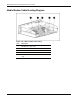
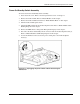
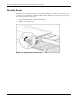
1. Remove the left and right shipping screws. The shipping screws may look like (1) or (2)
in the following figure.
Figure 5-1: Shipping screws
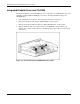
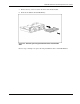
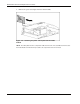
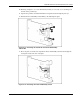
2. Rotate the module release levers downward.
3. Slide the module into the chassis until the levers begin to rotate.
4. Then push the levers upward until they snap into place.
HP ProLiant DL760 Generation 2 Server Maintenance and Service Guide 5-1