
ProLiant DL760 Generation 2 Server Maintenance and Service Guide

Media Module Removal and Replacement Procedures
4-16 HP ProLiant DL760 Generation 2 Server Maintenance and Service Guide
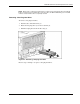
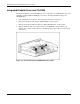
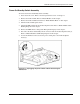
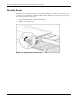
To reinstall the Power On/Standby switch assembly:
1. Place the power switch plate on its left side and push the Power On/Standby switch up
through the rectangular cutout to its original position.
2. Line up the keyhole-shaped cutouts on the power switch plate with the spools in the right
wall of the media module.
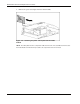
3. Slide the plate back into the media module until the hole in the back of the power switch
plate lines up with the thumbscrew.
4. Tighten the thumbscrew.
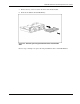
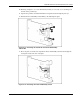
5. Push the Power On/Standby switch LED through the power switch plate to its original
position.
6. Push the Thermistor through the power switch plate.
7. Rotate the Thermistor to its original position.
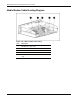
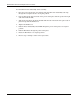
8. Reverse steps 1 through 7 of the removal procedure.