
ProLiant DL760 Generation 2 Server Maintenance and Service Guide

Media Module Removal and Replacement Procedures
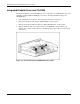
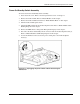
10. Referring to Figure 4-13, rotate the Thermistor until you can easily access the flanges on
the side of the grommet (1).
11. Squeeze the grommet around the Thermistor and push it back through the plate (2).
12. Push the Power On/Standby switch LED (3) back through the plate.
Figure 4-13: Removing the Thermistor and Power On/Standby
switch LED
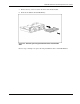
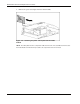
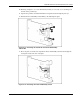
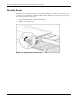
13. Place the plate on its left side and push the Power On/Standby switch down through the
rectangular cutout and clear of the plate.
Figure 4-14: Removing the Power On/Standby switch
HP ProLiant DL760 Generation 2 Server Maintenance and Service Guide 4-15