
ProLiant DL760 Generation 2 Server Maintenance and Service Guide

Media Module Removal and Replacement Procedures
Integrated Diskette Drive and CD-ROM
The media module has a one third-height drive bay occupied by a 1.44-MB diskette drive and
24X Max (or higher) IDE CD-ROM drive. To remove the integrated diskette drive and
CD-ROM drive:
1. Power down the server. Refer to “Pow ering Down the Server” in Chapter 2.
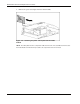
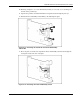
2. Remove the media module. Refer to “Media Modul e” in this chapter.
3. Remove the media module bezel. Refer to “Media Module Bezel” in this chapter.
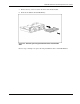
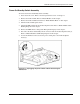
4. Turn the media module over and disconnect the CD-ROM drive signal cable (1), the
diskette drive control and data cable (2), and diskette drive power cable (3) from the back
of the drives.
Figure 4-8: Disconnecting the CD-ROM/diskette drive cables
4-10 HP ProLiant DL760 Generation 2 Server Maintenance and Service Guide