
ProLiant DL760 Generation 2 Server Maintenance and Service Guide
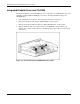
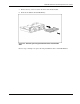
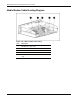

Media Module Removal and Replacement Procedures
NOTE: When a drive configured for fault tolerance is replaced, the replacement drive automatically
begins restoring when it is installed. When restoring a drive, the Online LED blinks green. The LED
continues to flash until the drive is completely restored.
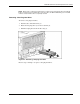
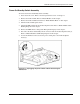
Removing a Hot-Plug Hard Drive
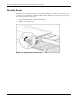
To remove a hot-plug hard drive:
1. Push the tab to unlock the drive (1).
2. Rotate the hot-plug drive ejector lever outward (2).
3. Pull the hot-plug drive from the drive bay (3).
Figure 4-7: Removing a hot-plug hard drive
Reverse steps 1 through 3 to replace a hot-plug hard drive.
HP ProLiant DL760 Generation 2 Server Maintenance and Service Guide 4-9