
ProLiant DL760 Generation 2 Server Maintenance and Service Guide

Media Module Removal and Replacement Procedures
Integrated Management Display
To remove the IMD:
1. Power down the server. Refer to “Pow ering Down the Server” in Chapter 2.
2. Remove the media module. Refer to “Media Modul e” in this chapter.
3. Remove the bezel. Refer to “Med ia Module Bezel” in this chapter.
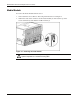
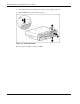
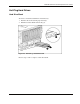
4. Turn the media module over and disconnect the IMD cable from the media backplane
board. Refer to “Media Module Cable R outing Diagram” in this chapter.
Figure 4-4: Removing the IMD cable
HP ProLiant DL760 Generation 2 Server Maintenance and Service Guide 4-5