
ProLiant DL760 Generation 2 Server Maintenance and Service Guide

Media Module Removal and Replacement Procedures
Media Module Bezel
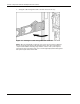
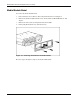
To remove the media module bezel:
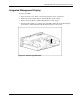
1. Power down the server. Refer to “Pow ering Down the Server” in Chapter 2.
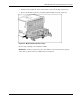
2. Remove the media module from the server chassis. Refer to “Media Module” in this
chapter.
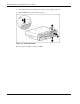
3. Remove the four screws securing the bezel to the module.
4. Lift up and pull the bezel away from the chassis.
Figure 4-3: Removing the bezel from the media module
Reverse steps 1 through 4 to replace the media module bezel.
4-4 HP ProLiant DL760 Generation 2 Server Maintenance and Service Guide