
ProLiant DL760 Generation 2 Server Maintenance and Service Guide

Chassis Components Removal and Replacement Procedures
Cable Management Arm
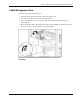
To remove the cable management arm:
1. Label all cables running through the cable management arm.
2. Disconnect all cables from the rear of the I/O module.
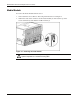
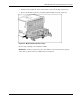
3. Loosen the thumbscrew that secures the cable management arm and bracket to the
I/O module (1).
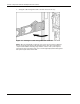
4. Move the bracket, with cable management arm attached, slightly up and then back from
the server (2) to access the cam levers on the I/O module.
Figure 3-7: Disconnecting the cable management bracket from the
I/O module
HP ProLiant DL760 Generation 2 Server Maintenance and Service Guide 3-7