
ProLiant DL760 Generation 2 Server Maintenance and Service Guide


Chassis Components Removal and Replacement Procedures
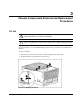
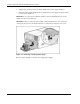
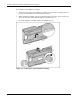
To install the system midplane assembly:
1. Angle the bottom edge of the midplane assembly into the chassis (1), making sure that
the edge is seated under the chassis midplane retainers.
2. Tilt the midplane assembly vertical (2) unsuring that the tab on the chassis engages the
slot on the assembly. This holds the midplane assembly in place.
3. Secure the midplane assembly with the two thumbscrews (3).
Figure 3-6: Installing the system midplane assembly
3-6 HP ProLiant DL760 Generation 2 Server Maintenance and Service Guide