
ProLiant DL760 Generation 2 Server Maintenance and Service Guide

Chassis Components Removal and Replacement Procedures
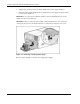
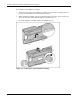
2. Squeeze upward on the release tab in the middle of the power supply handle (1).
3. Rotate the power supply handle down (2) and slide the power supply out of the chassis
(3) as shown in Figure 3-4.
IMPORTANT: Use only the power supply part number for the ProLiant DL760 G2 server. Power
supplies from other servers will not fit.
IMPORTANT: When you remove the power supply, a spring-loaded trap door closes to block the
opening. This door preserves the air path required to cool the internal components of the server.
Figure 3-4: Removing a hot-plug power supply
Reverse steps 1 through 3 to replace the hot-plug power supply.
3-4 HP ProLiant DL760 Generation 2 Server Maintenance and Service Guide