
ProLiant DL760 Generation 2 Server Maintenance and Service Guide


Chassis Components Removal and Replacement Procedures
To estimate the power requirements for a specific server configuration, use the ProLiant
DL760 Generation 2 server Power Calculator located on the HP ActiveAnswers Online
Solutions website:
activeanswers.hp.com
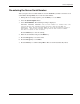
1. Select System Configurator under Tools.
2. Click Select Product Family and select ProLiant Servers.
3. From the list, select ProLiant DL760 G2 Server.
The subsequent Web pages contain information and a link to the ProLiant DL760 Generation
2 server Power Calculator.
To replace a hot-plug power supply with the system power on:
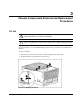
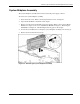
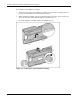
1. Remove the power cord from the power supply to replace and release the power cord
clamp.
Figure 3-3: Removing the power cord
HP ProLiant DL760 Generation 2 Server Maintenance and Service Guide 3-3