
ProLiant DL760 Generation 2 Server Maintenance and Service Guide

Chassis Components Removal and Replacement Procedures
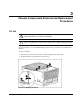
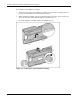
To remove the I/O lid:
1. Remove the processor and memory module. Refer to Chapter 5.
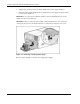
2. Slide the I/O lid out of the front of the server.
Figure 3-2: Removing the I/O lid
NOTE: HP recommends leaving the I/O lid locked during normal use.
Hot-Plug Power Supply
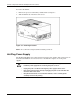
The ProLiant DL760 G2 server ships with two hot-plug power supplies. The system power in
the ProLiant DL760 G2 server does not have to be shut off to replace one of the power
supplies.
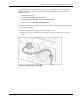
WARNING: To reduce the risk of electric shock or damage to the equipment:
• Install the power supply before connecting the power cord to it.
• Unplug the power cord before removing the power supply from the server.
• Disconnect power from the server by unplugging all power cords from either the
electrical outlet or the server.
• Keep the work area free of nonconductive materials, such as ordinary plastic
assembly aids and foam packing.
3-2 HP ProLiant DL760 Generation 2 Server Maintenance and Service Guide