
ProLiant DL760 Generation 2 Server Maintenance and Service Guide

3
Chassis Components Removal and Replacement
Procedures
I/O Lid
WARNING: To reduce the risk of personal injury from hot surfaces, allow the internal
system components to cool before touching them.
CAUTION: When the server is powered on, the access panel must be installed for proper
system cooling. Otherwise, component stress and permanent equipment damage may result.
Open the I/O lid to access the PCI Hot Plug expansion slots, system fans, and configuration
switches.
To open the I/O lid:
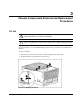
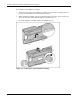
1. Unlock the top latch security screw (1) and then pull the latch forward (2).
2. Slide the I/O lid toward the front of the server (3).
Figure 3-1: Opening the I/O lid
HP ProLiant DL760 Generation 2 Server Maintenance and Service Guide 3-1