
ProLiant DL760 Generation 2 Server Maintenance and Service Guide


Service Preparation
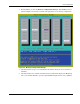
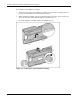
7. Press the F1 key to enter the Memory Configuration Manager. This ROM-based tool
(shown in Figure 2-6) is used to examine and upgrade the server memory configuration.
Figure 2-6: Memory Configuration Manager
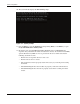
8. Check the monitor for processor initialization information. Each processor is listed as it
initializes.
9. Check the monitor for controller information. The system briefly displays the F8 prompt
after each controller POSTs to open the Option ROM Configuration for Arrays (ORCA).
HP ProLiant DL760 Generation 2 Server Maintenance and Service Guide 2-13