
ProLiant DL760 Generation 2 Server Maintenance and Service Guide

Service Preparation
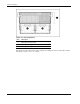
Table 2-1: Module and Bay Components and Access describes the contents of the modules
and how to access the components.
Table 2-1: Module and Bay Components and Access
Module Contents Access Method
PCI Hot Plug expansion slots Slide the I/O lid toward the
front of the server.
Configuration switches Slide the I/O lid toward the
front of the server.
I/O module with system fans
Fans 1 and 2 Slide the I/O lid toward the
front of the server.
Processor (CPU) sockets Remove the Processor and
Memory Module and the
processor board.
Processor and memory
module
Memory (DIMMs) Remove the memory cartridge.
CD-ROM/
Diskette/IMD
Access directly at the front of
the server.
Media module
Hot-plug hard drives Access directly at the front of
the server.
Preparation Procedures
To access some components and perform certain service procedures, you must do one or
more of the following:
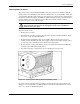
• Extend the server from the rack.
If you are performing service procedures in an HP rack or third-party rack cabinet, you
can user the locking feature of the rack rails to support the server and gain access to
internal components.
• Power down the server.
If you must remove a server from a rack or a non-hot-plug component from a server,
power down the server.
• Remove the server from the rack.
If the rack environment, cabling configuration, or the server location in the rack creates
awkward conditions, remove the server from the rack.
To service the ProLiant DL760 G2 server, you might need the following:
• Flat-blade screwdriver (4 millimeter)
• Torx T-15 screwdriver
• Phillips screwdriver
• HP SmartStart CD:
HP ProLiant DL760 Generation 2 Server Maintenance and Service Guide 2-7