
ProLiant DL760 Generation 2 Server Maintenance and Service Guide


Connectors, Switches, and LED Indicators
HP ProLiant DL760 Generation 2 Server Maintenance and Service Guide 8-15
Memory Cartridge LED Indicators
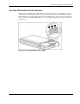
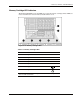
The ProLiant DL760 G2 server has LEDs for each of the memory cartridges. These LEDs are
used to determine the status of memory installed in the server.
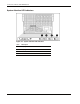
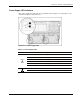
Figure 8-15: Memory cartridge LEDs
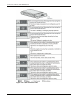
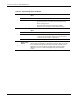
Table 8-5: Memory Cartridge LEDs
Item LED Indicator LED Icon
1 Cartridge 1 DIMM status LED
1 2 3 4 5 6 7 8
2 Cartridge 2 DIMM status LED
1 2 3 4 5 6 7 8
3 Cartridge 3 DIMM status LED
1 2 3 4 5 6 7 8
4 Cartridge 4 DIMM status LED
1 2 3 4 5 6 7 8
5 Cartridge 5 DIMM status LED
1 2 3 4 5 6 7 8
6 Cartridge power LED
7 Cartridge attention LED
Note: These LEDs are backlit through icon lenses. An icon only appears
when the LED is illuminated.