
ProLiant DL760 Generation 2 Server Maintenance and Service Guide

Connectors, Switches, and LED Indicators
PCI Hot Plug LED Indicators
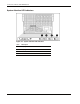
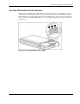
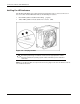
The PCI Hot Plug amber (1) and green (2) LEDs (shown in the following figure for one slot)
provide a visual reference of each slot’s status. The LEDs are viewed from the rear of the
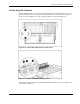
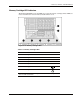
server, as shown in Figure 8-13, or by opening the I/O lid, as shown in Figure 8-14.
Figure 8-13: PCI Hot Plug LEDs from rear of the server
Figure 8-14: PCI Hot Plug LEDs in the I/O module
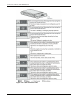
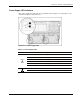
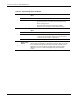
A description and slot status for the PCI Hot Plug LEDs and button, as shown in Figure 8-14,
are provided in Table 8-4.
HP ProLiant DL760 Generation 2 Server Maintenance and Service Guide 8-13