
ProLiant DL760 Generation 2 Server Maintenance and Service Guide
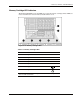

Connectors, Switches, and LED Indicators
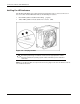
Hot-Plug Fan LED Indicators
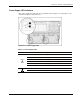
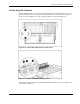
The ProLiant DL760 G2 server ships with two hot-plug fans. Fan 1 is closest to the rear of
the server. Each fan has LEDs that indicate the following fan statuses:
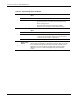
• Green LED (1)—Fan is installed and working properly.
• Amber LED (2)—The fan needs attention or is not ins talled.
Figure 8-12: Hot-plug fan LEDs
CAUTION: Never remove both hot-plug fans while the server is powered up.
Overheating and damage to hardware could result. If the appropriate HP software
drivers are installed, the operating system software will initiate a power shutdown if
overheated.
NOTE: The hot-plug fan LEDs are not part of the fan housing. Figure 8-12 shows the LEDs as if the fan
were installed in the server.
8-12 HP ProLiant DL760 Generation 2 Server Maintenance and Service Guide