
ProLiant DL760 Generation 2 Server Maintenance and Service Guide

Connectors, Switches, and LED Indicators
System Interconnect LED Indicators
To prevent damage to critical system components, the ProLiant DL760 G2 server will not
power up if it detects that certain components are not installed or are installed incorrectly.
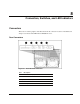
The system interconnect LEDs provided with ProLiant DL760 G2 servers provide a
closed-loop checking mechanism for verifying proper component mating and
interconnections between critical server components. LEDs inside the sliding top cover
provide visual assistance in isolating components to check if the server will not power up due
to a component or module that is not fully installed. If a status indicator light is on, reseat the
component represented by the indicator. Refer to the hood labels for component location.
IMPORTANT: To check system interconnect status LEDs, place the server in Standby with the power
supplies plugged in.
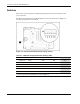
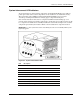
Figure 8-7: System interconnect LEDs
Item Description
1 I/O module interconnect
2 Processor and memory module interconnect
3 Processor board 1 interconnect
4 Processor board 2 interconnect
5 Memory riser board interconnect
6 Media module interconnect
7 SCSI backplane 1 interconnect
8 SCSI backplane 2 interconnect
9 Interconnect check light
HP ProLiant DL760 Generation 2 Server Maintenance and Service Guide 8-7