
ProLiant DL760 Generation 2 Server Maintenance and Service Guide

Connectors, Switches, and LED Indicators
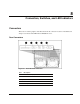
LED Indicators
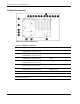
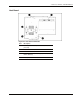
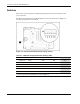
Status LEDs are located on the front, back, and inside of the server. These LEDs
communicate the current status of varying aspects of the server’s components and operations,
thus aiding you in diagnosing problems. The following ProLiant DL760 G2 server LEDs are
explained in this chapter.
• System Power LED—Located on the server above the power butto n
• Server auxiliary power LED—Locat ed on the I/O board
• System interconnect LEDs—Located on the top of the server
• System attention LEDs—Located on the front left side of the server
• Hot-plug SCSI hard drive LEDs—Loca ted on the front of each hard drive
• Power supply LEDs—Located on the rear of the server
• Hot-plug fan LEDs—Loca ted on each fan, inside the server
• PCI Hot Plug LEDs—Located on the rear of the server and inside th e I/O module
• Memory cartridge LEDs— Located on the memory cartridges
• DIMM status LEDs—Located on the fro nt under the memory cartridges
HP ProLiant DL760 Generation 2 Server Maintenance and Service Guide 8-5