
ProLiant DL760 Generation 2 Server Maintenance and Service Guide
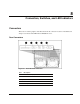

Connectors, Switches, and LED Indicators
Switches
This section contains graphics and tables showing switch locations and settings on the
processor board.
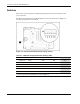
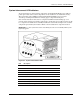
The I/O board configuration switchbank (SW1) is located on the I/O board. Figure 8-4
describes the function of each switch.
Figure 8-4: I/O board switchbank (default settings shown)
Table 8-2: I/O Board Configuration Switch Settings (SW1)
Switch Function Enable Disable Default
S1 On-boar d video OFF ON OFF
S2 Config uration lock ON OFF OFF
S3 Rack-mount - - OFF
S4 Diskette boot override ON OFF OFF
S5 Boot password OFF ON OFF
S6 Clear NVRAM * ON OFF OFF
* You must re-enter the server serial number through RBSU after you clear NVRAM. Refer to the
“Re-entering the Server Serial Number” section in Chapter 2.
8-4 HP ProLiant DL760 Generation 2 Server Maintenance and Service Guide