
ProLiant DL760 Generation 2 Server Maintenance and Service Guide

Diagnostic Tools
7-4 HP ProLiant DL760 Generation 2 Server Maintenance and Service Guide
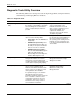
Table 7-1: Diagnostic Tools continued
Tool What it is How to run it
Array Diagnostics Utility
(ADU)
ADU is a Windows-based tool designed to
run on all HP systems that support HP
array controllers. The two main functions
of ADU are:
• To collect all possible information
about the array controllers in the
system.
• To generate a list of detected
problems.
This tool is available for all HP servers
covered by this guide.
Use the information provided in the
ADU.
For a complete list of ADU error
messages, refer to the HP Servers
Troubleshooting Guide.
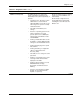
Drive Array Advanced
Diagnostics (DAAD)
The predecessor to ADU, DAAD is a
DOS-based tool for HP servers with Smart
Array Controllers. DAAD collects
information about the array controllers in
the system and offers a list of detected
problems.
For a list of HP servers still supported
by this tool, visit the HP website:
www.hp.com
Integrated Management Log
(IML)
IML is a log of system events, such as
system failures or nonfatal error
conditions. View events in the Integrated
Management Log from within:
• Insight Manager
• Survey Utility
• Operating system-specific IML utilities
The Integrated Management Log
requires HP operating system-
dependent drivers. Refer to the
Support Software CD for instructions
on installing the appropriate drivers.
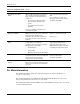
Power-On Self Test A diagnostic testing sequence run by the
server when power is turned on. POST will
determine if the server hardware
components are properly working.
For a list of POST error messages,
refer to the HP Servers
Troubleshooting Guide.
Automatic Server Recovery
(ASR-2)
ASR-2 is a feature of HP Systems Health
Driver. If a server failure extends beyond a
set time, the system reboots and attempts
to recover.
For More Information
For detailed information about each of these diagnostic tools, refer to the HP Servers
Troubleshooting Guide.
For detailed information on troubleshooting the ProLiant DL760 G2 server, refer to the
HP ProLiant DL760 Generation 2 Server User Guide.
For detailed information about the RBSU, refer to the ROM-Based Setup Utility User Guide
on the Documentation CD.