
ProLiant DL760 Generation 2 Server Maintenance and Service Guide

Diagnostic Tools
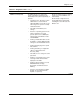
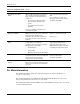
Table 7-1: Diagnostic Tools continued
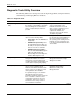
Tool What it is How to run it
ROM-based Setup Utility The RBSU allows you to change the
system configuration settings from the
initial startup of the system. Specifically, it
provides:
• “Virtual Presence” allowing a system
administrator to use the Remote
Lights-Out Edition to remotely access
and configure the system in a totally
unattended fashion.
• The ability to immediately save
settings.
• Selection of operating system. It also
allows configuration of system
specific options such as COM ports
and LPT ports, standard boot order,
and NUMLOCK.
• Viewing of installed PCI devices and
the ability to configure IRQ (interrupt)
settings for each installed PCI device.
• Viewing and changing of the system
date and time.
• Viewing and setting of configuration
options for Automatic Server
Recovery (ASR).
• The ability to set or change the server
passwords.
• Setting or customization of the server
asset tag and the text that will be
displayed on the IMD.
• Setting of advanced options such as
MPS/APIC Mode, Hot-plug
Reservation, and CPU Correction
Marking.
• Selection of the language for RBSU
(English, French, Italian, German,
Spanish, or Japanese).
On an unconfigured server, powering
up the server causes RBSU to run
automatically.
On an already configured server,
pressing F9 when prompted after
restarting the server will cause the
RBSU to run.
continued
HP ProLiant DL760 Generation 2 Server Maintenance and Service Guide 7-3