
ProLiant DL760 Generation 2 Server Maintenance and Service Guide

Diagnostic Tools
Diagnostic Tools Utility Overview
The following utilities were developed to assist in diagnosing problems, testing the hardware,
and monitoring and managing HP server hardware.
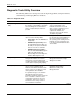
Table 7-1: Diagnostic Tools
Tool What it is How to run it
Enterprise Diagnostics LX 32
Utility
This utility assists in testing and verifying
the operation of HP hardware. If problems
are found, Diagnostics isolates failures
down to a replaceable part, whenever
possible.
Diagnostics and utilities are located
on the system partition of the
hard drive and must be accessed
when a system configuration error is
detected during POST. For a
complete list of POST error
messages, refer to the HP Servers
Troubleshooting Guide.
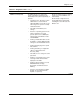
System Maintenance Menu The System Maintenance Menu has the
option to run the following utilities:
• Setup Utility—Runs the ROM-Based
Setup Utility.
• ROM-Based Inspect Utility—Runs
the embedded inspection utility. Use
this utility to view system information
and save it to a file on a diskette.
• ROM-Based Diagnostic Utility—
Runs the embedded ROM Diagnostic
Utility. This utility includes the
Memory Diagnostic, CPU Diagnostic,
and Boot Disk Diagnostic tests.
The System Maintenance Menu can
be opened by pressing the F10 key at
the end of system boot, just prior to
the operating system loading from the
hard disk. For more information refer
to the HP ProLiant DL760 Generation
2 User Guide.
Insight Manager 7 This client/server application remotely
manages HP hardware in a network
environment. It reports hardware fault
conditions (both failure and prefailure) and
collects data for reporting and graphing.
For more information, refer to the
Management CD and the Insight
Manager User Guide.
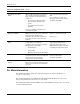
Survey Utility This online information-gathering agent
runs on servers, gathering critical
hardware and software information from
various sources. It is a utility for servers
running Windows NT or NetWare.
If a significant change occurs between
data gathering intervals, previous
information is marked, and the survey text
file is overwritten to reflect the latest
configuration and changes since last
configuration. This process creates a
historical record of change events for
server hardware and software.
Install the Survey Utility from
SmartStart, the Integration
Maintenance Utility, or the
Management CD.
continued
7-2 HP ProLiant DL760 Generation 2 Server Maintenance and Service Guide