
Microsoft Exchange 2000 Consolidation Using ProLiant Essentials Workload Management Pack

Microsoft Exchange 2000 Consolidation Using
T
ECHNOLOGY BRIEF (cont.) ProLiant Essentials Workload Management Pack
.
.
.
.
.
.
.
.
.
.
.
.
.
.
.
.
.
.
.
.
.
.
.
.
.
.
.
.
.
.
.
.
.
.
.
.
.
.
.
.
.
.
.
.
.
.
.
.
.
.
.
.
.
.
.
.
.
.
.
.
.
.
.
.
.
.
.
.
.
.
.
.
.
.
.
.
.
.
.
.
.
.
.
.
.
.
.
.
.
.
.
.
.
.
.
.
.
.
.
.
.
.
.
.
.
.
.
.
.
.
.
.
.
.
.
.
.
.
.
.
.
.
.
.
.
.
.
.
.
.
.
.
.
.
.
.
.
.
.
.
.
.
.
.
.
.
.
.
.
.
.
.
.
.
.
.
.
.
.
.
Processor Utilization
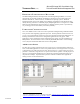
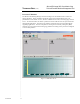
The Resource Partitioning Manager screen shown Figure 4 is the interface used to create and
manage partitions. Figure 4 indicates that for this 8-processor ProLiant DL760 server, two
partitions have been created: Exstore, which is available but not active, and manageapp, which is
active. As discussed earlier, the EXstore partition is used to isolate the store.exe process from the
management applications. The manageapp partition contains the processes associated with the
supporting applications. The store.exe process is running but not currently managed by RPM,
while the processes assigned to the manageapp partition are running on the processors configured
to service that partition.
Figure 4. RPM Main Screen
9
TC020602TB