
ProLiant DL740 Server Maintenance and Service Guide


Table Of Contents
- HP ProLiant DL740 Server Maintenance and Service Guide
- Notice
- Contents
- About This Guide
- Chapter 1: Illustrated Parts Catalog
- Chapter 2: Service Preparation
- Chapter 3: Chassis Components Removal and Replacement Procedures
- Chapter 4: Host Module Removal and Replacement Procedures
- Chapter 5: Power and Media Module Removal and Replacement Procedures
- Chapter 6: Diagnostic Tools
- Chapter 7: Connectors, Switches, and LED Indicators
- Connectors
- System Board
- Switches
- LED Indicators
- System Power LED Switch
- Unit Identification LED Switches (Front and Rear)
- System Interconnect LED Indicators
- System Attention LED Indicators
- System Activity LED Indicators
- Hot-Plug SCSI Hard Drive LED Indicators
- Power Supply LED Indicators
- Hot-Plug Fan LED Indicators
- PCI Hot Plug LED Indicators
- Memory Cartridge LED Indicators
- DIMM Status LED Indicators
- Chapter 8: Physical, Operating, and Performance Specifications
- Index
Connectors, Switches, and LED Indicators
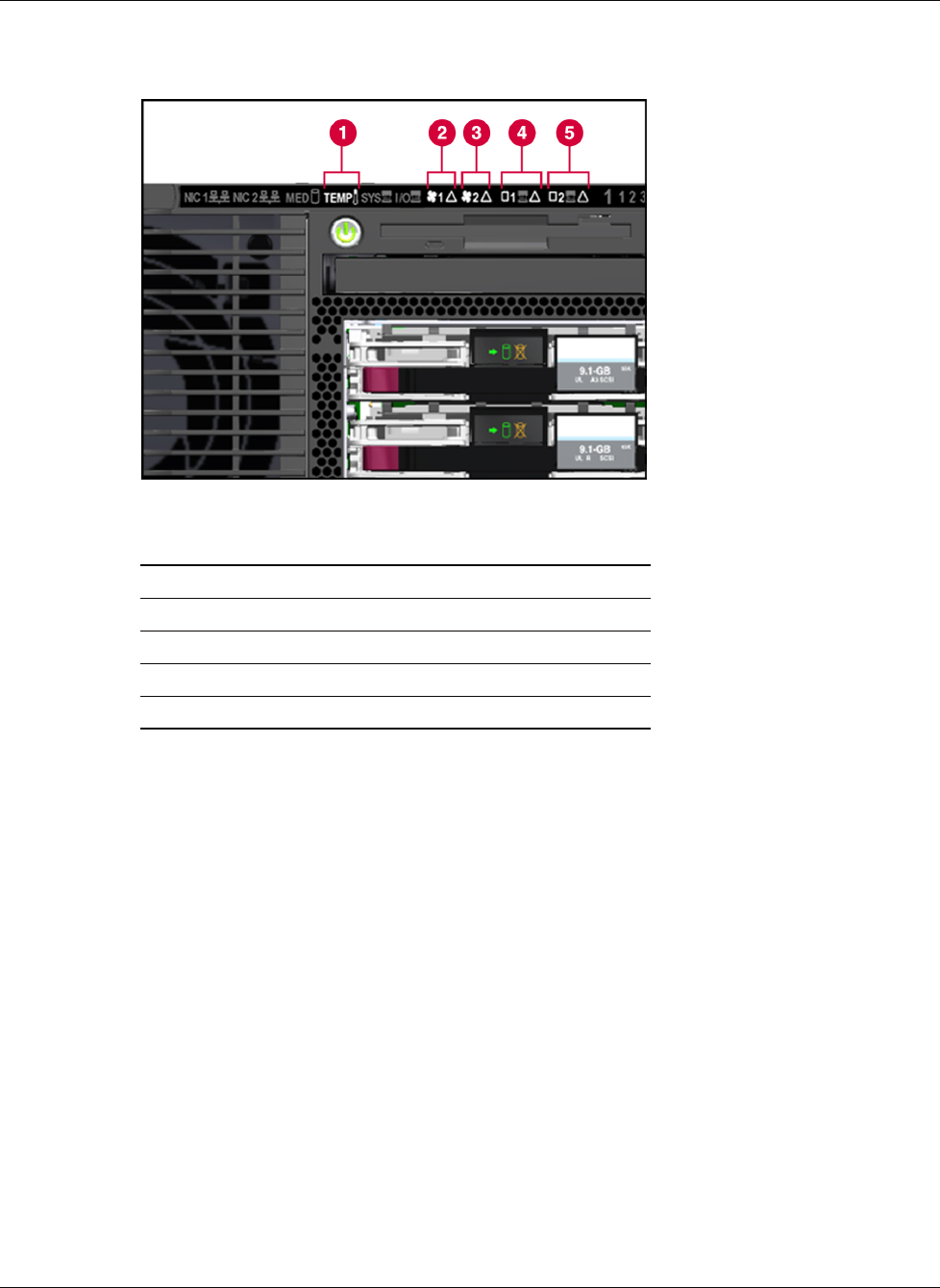
System Attention LED Indicators
Figure 7-8: System attention LEDs
Item Description
1 Temperature attention
2 Hot-plug fan 1 attention
3 Hot-plug fan 2 attention
4 Processor board 1 attention
5 Processor board 2 attention
The temperature attention LED has two possible states:
• Amber LED—The first temperature threshold has been reached. Fans are at high speed.
If the server location is at a normal temperature, check the health driver to determine
which sensor has tripped, and check the server to see if action is necessary.
• Red LED—The server is off because it reached an overtemperature state on one of its
sensors, and shut down to protect hardware. Check the health driver or Insight Manager
to determine which thermal sensor shut down.
7-10 HP ProLiant DL740 Server Maintenance and Service Guide
HP CONFIDENTIAL Codename: Jethro Part Number: 270853-004 Last Saved On: 2/10/04 3:53 PM