
ProLiant DL740 Server Maintenance and Service Guide




Table Of Contents
- HP ProLiant DL740 Server Maintenance and Service Guide
- Notice
- Contents
- About This Guide
- Chapter 1: Illustrated Parts Catalog
- Chapter 2: Service Preparation
- Chapter 3: Chassis Components Removal and Replacement Procedures
- Chapter 4: Host Module Removal and Replacement Procedures
- Chapter 5: Power and Media Module Removal and Replacement Procedures
- Chapter 6: Diagnostic Tools
- Chapter 7: Connectors, Switches, and LED Indicators
- Connectors
- System Board
- Switches
- LED Indicators
- System Power LED Switch
- Unit Identification LED Switches (Front and Rear)
- System Interconnect LED Indicators
- System Attention LED Indicators
- System Activity LED Indicators
- Hot-Plug SCSI Hard Drive LED Indicators
- Power Supply LED Indicators
- Hot-Plug Fan LED Indicators
- PCI Hot Plug LED Indicators
- Memory Cartridge LED Indicators
- DIMM Status LED Indicators
- Chapter 8: Physical, Operating, and Performance Specifications
- Index
Power and Media Module Removal and Replacement Procedures
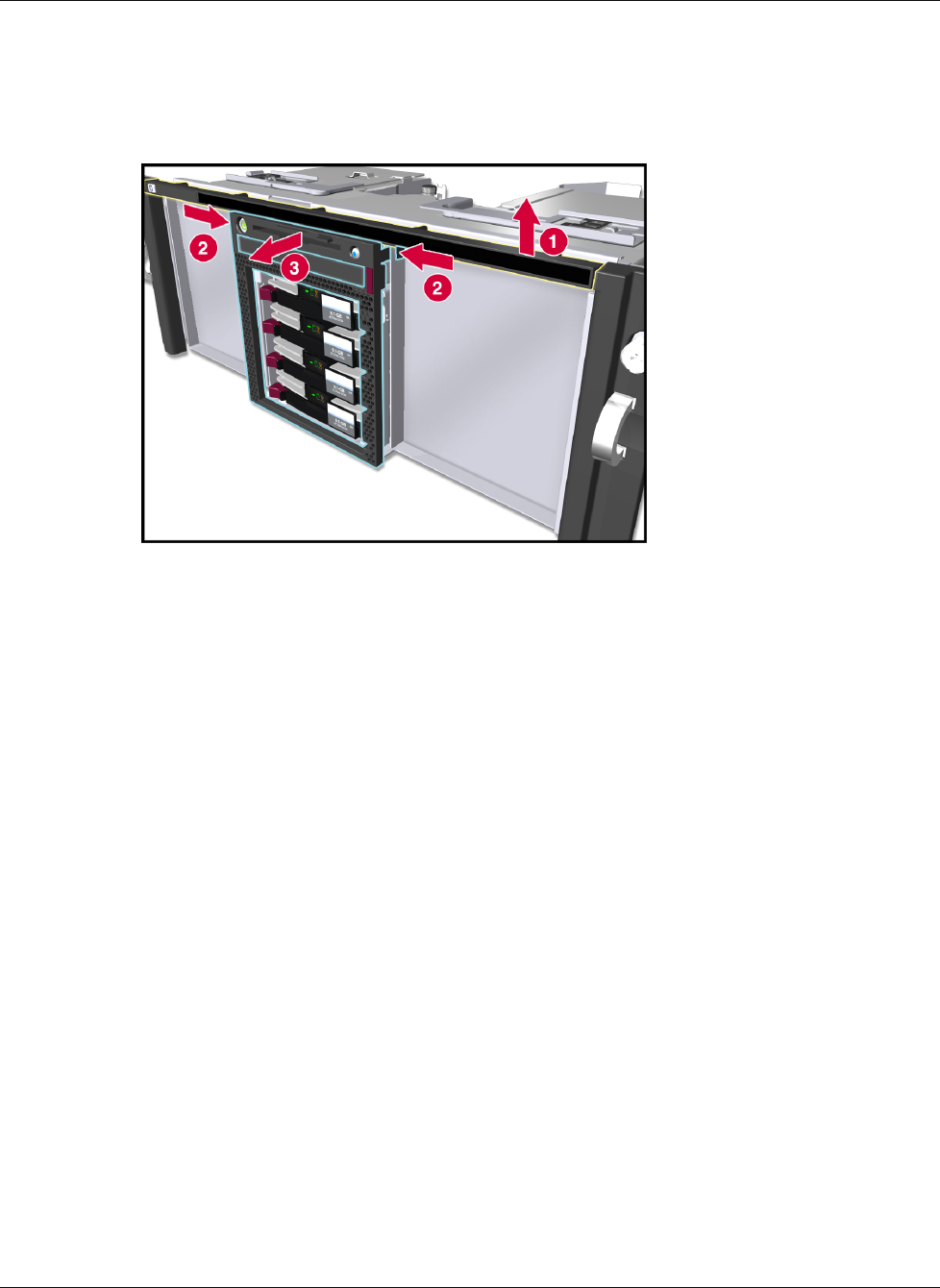
5. Remove the LED bezel by lifting it off the chassis.
6. Press the tabs on both sides of the bezel to release it from the chassis (2).
7. Pull the power and media module bezel away from the chassis (3).
Figure 5-7: Removing the bezels from the power and media module
Reverse steps 1 through 7 to replace the power and media module bezel.
Hot-Plug Hard Drives
Hot-Plug SCSI Hard Drive Replacement Guidelines
You should be able to hot-plug a drive during normal activity. Be aware, however, that
replacing a hot-pluggable disk drive will affect system performance and fault tolerance.
NOTE: Depending on your configuration, both a drive failure and the subsequent rebuild process will
cause storage subsystem performance degradation. For example, the replacement of a single drive on
an array with 50 logical drives will have less impact than if the array has only three logical drives.
Advanced Data Guarding
When a disk drive is hot-plugged, although the system is functionally operational, the disk
subsystem might no longer be fault tolerant. Fault tolerance will be lost until the removed
drive is subsequently replaced and the rebuild operation is completed. This procedure takes
several hours, even if the system is not busy while the rebuild is in progress. If another drive
in the array should incur an error during the period when fault tolerance is unavailable, a fatal
system error could result. If another drive fails during this period, the entire array contents
will be lost.
IMPORTANT: Perform disk drive replacement during low activity periods whenever possible. In
addition, a current valid backup of the logical drives in the array of the drive being replaced should be
available even if the drive replacement is being made during server downtime.
HP ProLiant DL740 Server Maintenance and Service Guide 5-9
HP CONFIDENTIAL Codename: Jethro Part Number: 270853-004 Last Saved On: 2/10/04 3:51 PM