
ProLiant DL740 Server Maintenance and Service Guide




Table Of Contents
- HP ProLiant DL740 Server Maintenance and Service Guide
- Notice
- Contents
- About This Guide
- Chapter 1: Illustrated Parts Catalog
- Chapter 2: Service Preparation
- Chapter 3: Chassis Components Removal and Replacement Procedures
- Chapter 4: Host Module Removal and Replacement Procedures
- Chapter 5: Power and Media Module Removal and Replacement Procedures
- Chapter 6: Diagnostic Tools
- Chapter 7: Connectors, Switches, and LED Indicators
- Connectors
- System Board
- Switches
- LED Indicators
- System Power LED Switch
- Unit Identification LED Switches (Front and Rear)
- System Interconnect LED Indicators
- System Attention LED Indicators
- System Activity LED Indicators
- Hot-Plug SCSI Hard Drive LED Indicators
- Power Supply LED Indicators
- Hot-Plug Fan LED Indicators
- PCI Hot Plug LED Indicators
- Memory Cartridge LED Indicators
- DIMM Status LED Indicators
- Chapter 8: Physical, Operating, and Performance Specifications
- Index
Power and Media Module Removal and Replacement Procedures
Removing and Replacing a Hot-Plug Power Supply
To remove and replace a hot-plug power supply with the system power on:
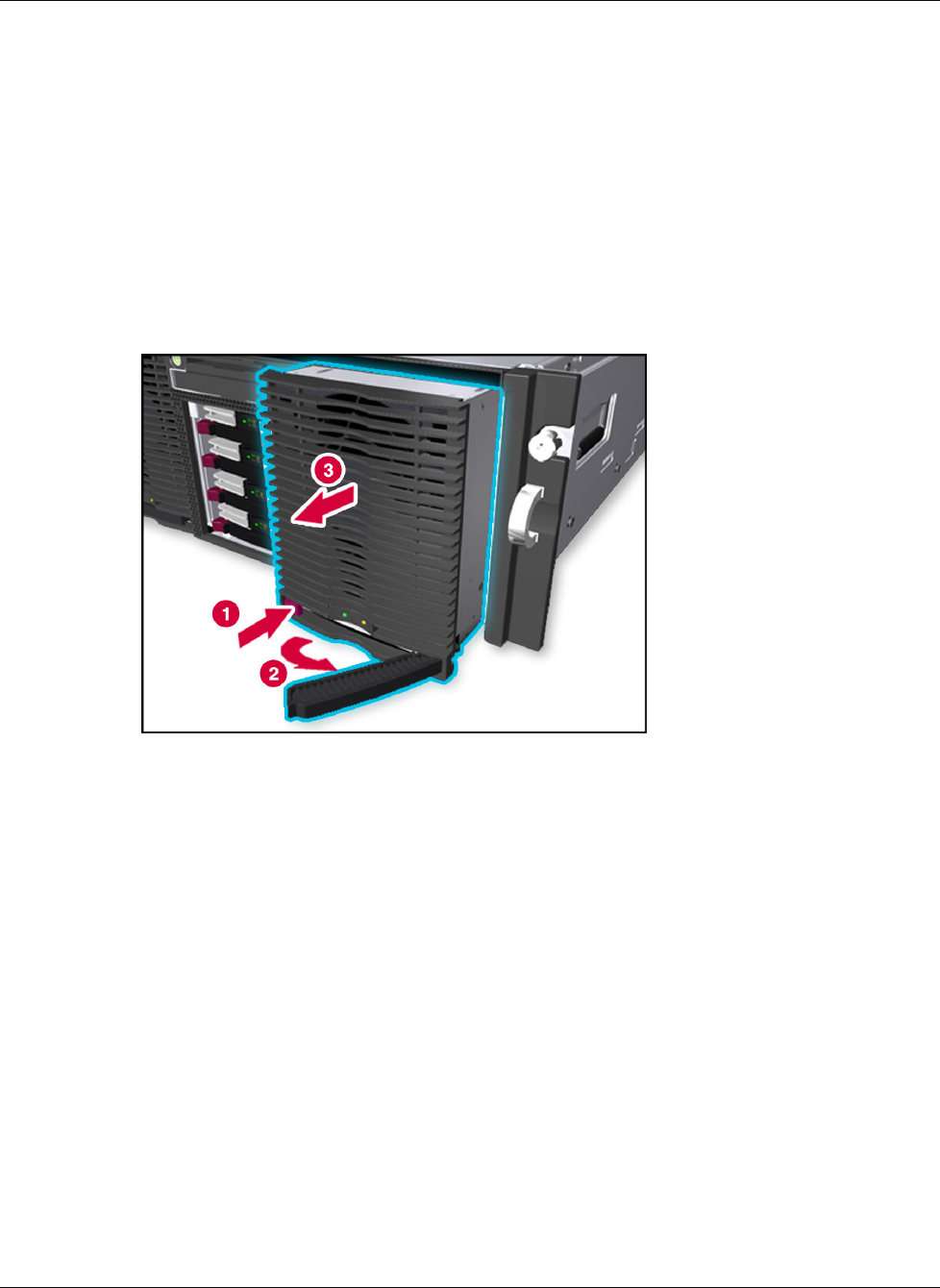
1. Press the power supply latch to release the power supply handle (1).
2. Rotate the power supply handle outward (2) and slide the power supply out of the
chassis (3), as shown in Figure 5-3. Use both hands when removing the power supply to
support its weight. Power supplies weigh 4.09 kg (9 lbs) each.
NOTE: When you remove the power supply, a spring-loaded trap door closes to block the opening.
This door preserves the air path required to cool the internal components of the server.
Figure 5-3: Removing a power supply
3. Remove the protective covers from the connector on the new power supply. For more
information, refer to the installation documentation that came with the power supply.
Keep the protective covers for future handling.
HP ProLiant DL740 Server Maintenance and Service Guide 5-5
HP CONFIDENTIAL Codename: Jethro Part Number: 270853-004 Last Saved On: 2/10/04 3:51 PM