
ProLiant DL740 Server Maintenance and Service Guide



Table Of Contents
- HP ProLiant DL740 Server Maintenance and Service Guide
- Notice
- Contents
- About This Guide
- Chapter 1: Illustrated Parts Catalog
- Chapter 2: Service Preparation
- Chapter 3: Chassis Components Removal and Replacement Procedures
- Chapter 4: Host Module Removal and Replacement Procedures
- Chapter 5: Power and Media Module Removal and Replacement Procedures
- Chapter 6: Diagnostic Tools
- Chapter 7: Connectors, Switches, and LED Indicators
- Connectors
- System Board
- Switches
- LED Indicators
- System Power LED Switch
- Unit Identification LED Switches (Front and Rear)
- System Interconnect LED Indicators
- System Attention LED Indicators
- System Activity LED Indicators
- Hot-Plug SCSI Hard Drive LED Indicators
- Power Supply LED Indicators
- Hot-Plug Fan LED Indicators
- PCI Hot Plug LED Indicators
- Memory Cartridge LED Indicators
- DIMM Status LED Indicators
- Chapter 8: Physical, Operating, and Performance Specifications
- Index
Host Module Removal and Replacement Procedures
4-20 HP ProLiant DL740 Server Maintenance and Service Guide
HP CONFIDENTIAL Codename: Jethro Part Number: 270853-004 Last Saved On: 2/13/04 10:40 AM
Removing or Replacing a Non-Hot-Plug Expansion Board
CAUTION: Do not open the slot release lever unless the green PCI Hot Plug LED indicator is
off. System power down and subsequent data loss could occur.
To remove a non-hot-plug expansion board:
1. Power down the server. Refer to “Powering Down the Server” in Chapter 2.
2. Slide the server out of the rack.
3. Open the top access panel. Refer to “Top Access Panels” in Chapter 3.
4. Remove any expansion board I/O cables as appropriate.
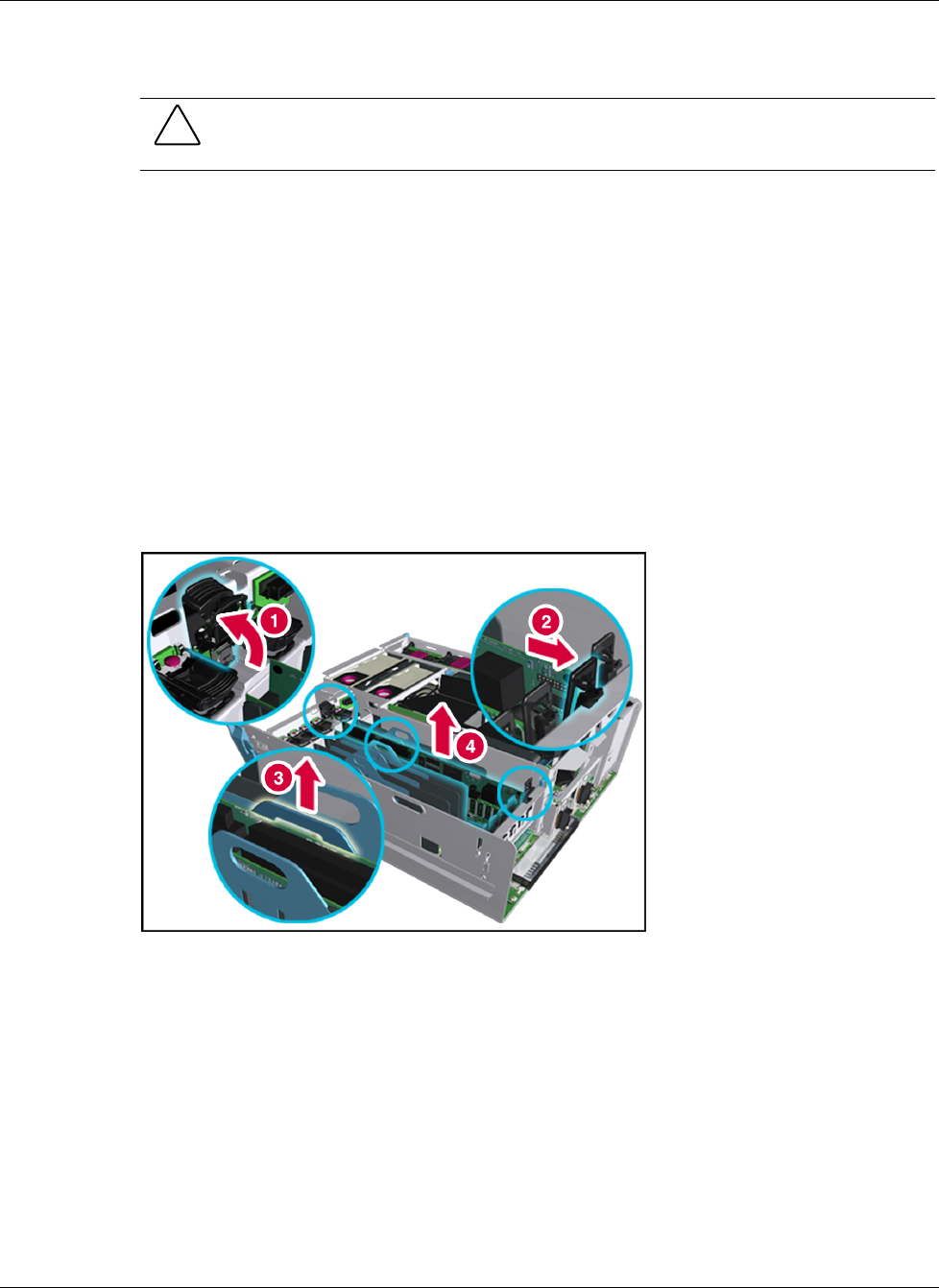
5. Press on the top of the appropriate expansion slot release lever (1) and open the
slot-keeper lever toward the front of the expansion slot (2).
6. Unseat the expansion board by pulling up on the plastic tab (3), and then lift the board out
of the server (4).
IMPORTANT: If you are only removing the expansion board, install an expansion slot cover in the slot.
Figure 4-18: Removing a non-hot-plug expansion board