
ProLiant DL740 Server Maintenance and Service Guide



Table Of Contents
- HP ProLiant DL740 Server Maintenance and Service Guide
- Notice
- Contents
- About This Guide
- Chapter 1: Illustrated Parts Catalog
- Chapter 2: Service Preparation
- Chapter 3: Chassis Components Removal and Replacement Procedures
- Chapter 4: Host Module Removal and Replacement Procedures
- Chapter 5: Power and Media Module Removal and Replacement Procedures
- Chapter 6: Diagnostic Tools
- Chapter 7: Connectors, Switches, and LED Indicators
- Connectors
- System Board
- Switches
- LED Indicators
- System Power LED Switch
- Unit Identification LED Switches (Front and Rear)
- System Interconnect LED Indicators
- System Attention LED Indicators
- System Activity LED Indicators
- Hot-Plug SCSI Hard Drive LED Indicators
- Power Supply LED Indicators
- Hot-Plug Fan LED Indicators
- PCI Hot Plug LED Indicators
- Memory Cartridge LED Indicators
- DIMM Status LED Indicators
- Chapter 8: Physical, Operating, and Performance Specifications
- Index
Host Module Removal and Replacement Procedures
HP ProLiant DL740 Server Maintenance and Service Guide 4-11
HP CONFIDENTIAL Codename: Jethro Part Number: 270853-004 Last Saved On: 2/13/04 10:40 AM
Removing the Memory Cartridge
To remove a memory cartridge from the ProLiant DL740 server:
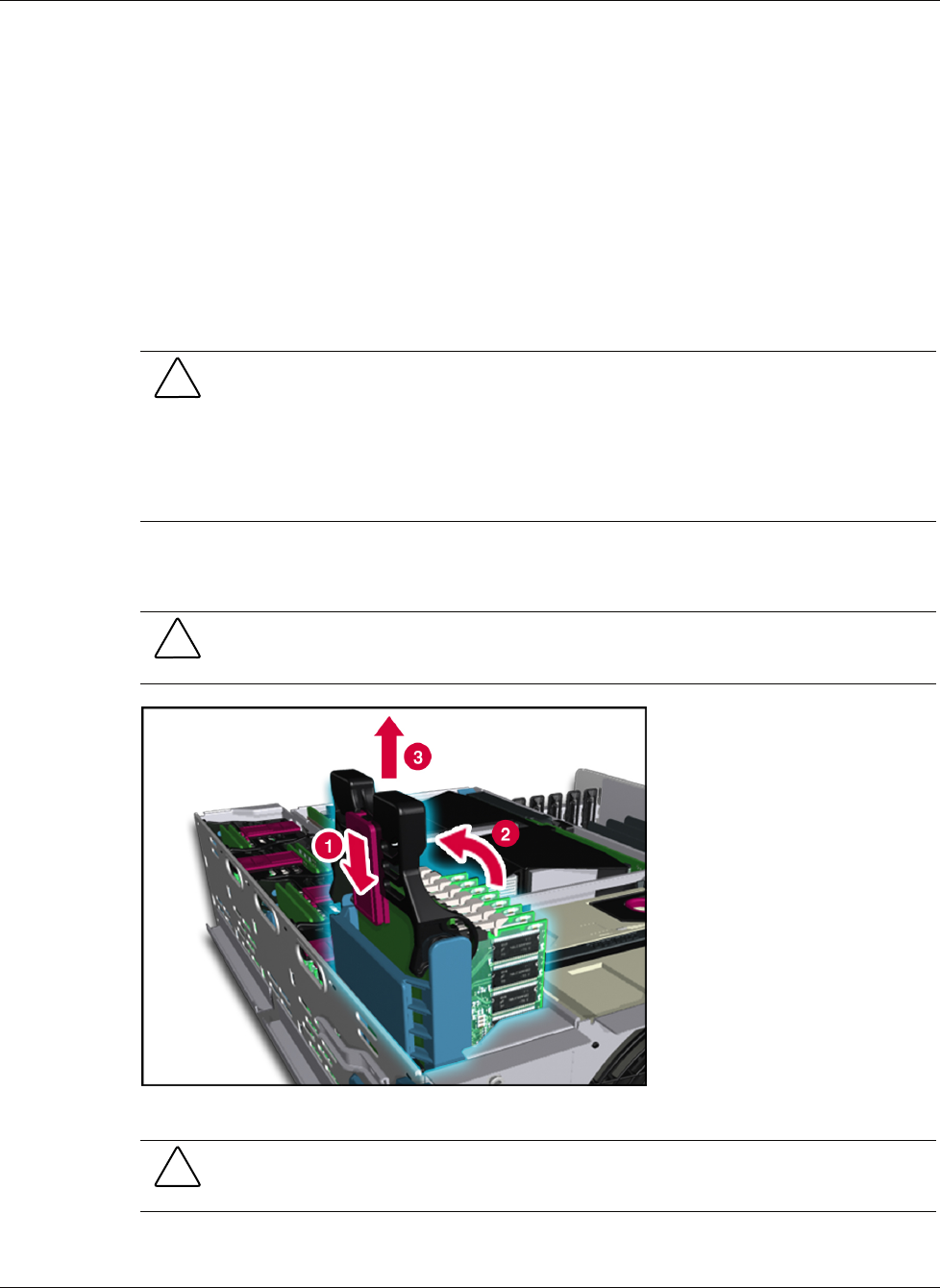
1. Unlock the memory cartridge by sliding the cartridge lock open (1).
IMPORTANT: If the memory cartridge is not required for continued operation (with at least four other
memory cartridges installed, online, and error free), the memory cartridge power LED will turn off.
IMPORTANT: If the cartridge is required for continued operation, an audible caution alarm will sound
and the memory cartridge attention LED indicator will blink until the cartridge is locked again.
2. Be sure that the cartridge power LED is off.
CAUTION: Do not remove a memory cartridge if the cartridge power LED is blinking or is
solid green. The system will halt.
If the cartridge power LED has not turned off after unlocking the cartridge, then one of the
following conditions exists:
• Another cartridge is either powered down or removed.
• Another cartridge in the system has errors.
3. Lift the cartridge lever upward to release the memory cartridge (2).
4. Pull the cartridge out of the host module (3).
CAUTION: Do not leave a memory cartridge out of its slot for more than two minutes to
ensure proper airflow and cooling.
Figure 4-12: Removing the memory cartridge
CAUTION: Inspect the memory cartridge for bent pins before reinstalling it. Do not “drop” the
cartridge into the cage.