
HP ProLiant DL740 Server User Guide


Installing Hardware Options, Hot-Plug
5-56 HP ProLiant DL740 Server User Guide
HP CONFIDENTIAL
Writer: Anna Roberts File Name: f-ch5 Installing Hardware Options Hot-Plug.doc
Codename: Expedition Part Number: 270854-002 Last Saved On: 6/17/03 2:09 PM
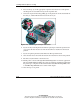
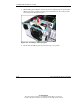
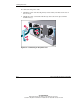
3. While holding the locking latch, lower the new hot-plug fan into the host module
until it rests on the system board connector. Push the fan into the connector. The
fan locking latch will lock into place.
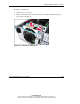
Figure 5-29: Installing a new hot-plug fan
4. Be sure that the LED is green, then close the top access panels.