
Deployment of SuSE Linux Enterprise Server 7 for Itanium Processor Family (IPF) on Compaq ProLiant DL590/64 Servers


Deployment of SuSE Linux Enterprise Server 7 for Itanium Processor Family (IPF) on Compaq ProLiant DL590/64 Servers 6
164J-0102A-WWEN
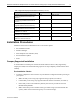
Table 3. Supported Compaq network interface controllers (continued)
Compaq NIC Driver Location
Compaq NC3135 Fast Ethernet Module Dual
(10/100 Upgrade Module for NC3134 and
NC3131)
e100 SuSE CD-ROM
Compaq NC6132 Gigabit Upgrade Module
(1000 SX Upgrade Module for NC3134 and
NC3131)
e1000 SuSE CD-ROM
Compaq NC6133 Gigabit Module (1000 LX
Upgrade Module for NC3134 and NC3131)
e1000 SuSE CD-ROM
Compaq NC3133 Fast Ethernet Module (100FX
Upgrade Module for NC3134 and NC3131)
e100 SuSE CD-ROM
Compaq NC6136 Gigabit Server Adapter, 64-
bit/66MHz, PCI, 1000 SX
e1000 SuSE CD-ROM
Compaq NC7131 Gigabit Server Adapter, 64-
bit/66MHz, PCI, 10/100/1000-T
e1000 SuSE CD-ROM
Compaq NC7132 10/100/1000-T Upgrade
Module for NC3134 and NC3131
e100 SuSE CD-ROM
Installation Procedures
Installation of the ProLiant DL590/64 occurs in five distinct phases:
• Pre-Installation Checks
• EFI Boot Manager
• SuSE Graphical User Interface (GUI)
• Post-Installation Updates
• SaX2
Compaq Supported Installation
To install SuSE Linux Enterprise on the ProLiant DL590/64 so that it is fully supported by
Compaq and SuSE, first read the following sequence of steps completely and then follow them
carefully.
Pre-Installation Checks
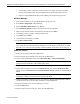
1. Verify the completeness and correctness of your hardware configuration before powering on
your system.
• Make sure that you are using only supported storage options (see Table 2).
• Confirm that you are using only supported network interface controllers (see Table 3).
• Ensure that you have not installed any memory that was not provided for use with
Itanium-based platforms.
• Make certain that you have installed some type of disk storage (not included with the
system), either on the internal storage bays or as external storage.