
Clustering Tips for Microsoft Windows Advanced Server, Limited Edition on Compaq ProLiant DL590/64 Server


Clustering Tips for Microsoft Windows Advanced Server, Limited Edition on Compaq ProLiant DL590/64 Server 9
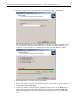
The wizard will analyze the system configuration to determine if a cluster is feasible. If there
are issues that arise during the analysis, the user may need to cancel the installation and
troubleshoot. Once the analysis is complete and no issues arise, click Next to continue.
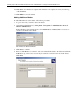
5. Enter the password of the Cluster Service account. Click Next.
6. Verify the configuration settings and click Next. The cluster will now be installed on the
node(s).
7. Click Next once all tasks are complete. The wizard is now complete. You may view the log
of the installation.
8. Click Finish to close the wizard.
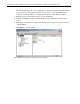
The installation of the cluster on all nodes is now complete.