
Clustering Tips for Microsoft Windows Advanced Server, Limited Edition on Compaq ProLiant DL590/64 Server


Clustering Tips for Microsoft Windows Advanced Server, Limited Edition on Compaq ProLiant DL590/64 Server 8
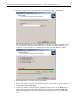
10. Click Next once all tasks are complete. The wizard is now complete. You may view the log
of the installation.
11. Click Finish to close the wizard.
Adding Additional Nodes
To add additional nodes to the cluster, follow these procedures:
1. Log on to the node you wish to add to the cluster.
2. Open Cluster Administrator by clicking Start à Programs à Administrative Tools à
Cluster Administrator.
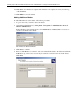
If the following popup window appears, select Add nodes to a cluster. Enter, or browse to
search for, the name of the cluster.
The Add Nodes Wizard will start.
3. Click Next to continue.
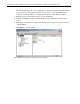
4. Enter, or click Browse to search for, each server that will be added to the cluster and click the
Add button. Up to three more servers may be added for a total of four nodes in the cluster.
Click Next.