
Clustering Tips for Microsoft Windows Advanced Server, Limited Edition on Compaq ProLiant DL590/64 Server


Clustering Tips for Microsoft Windows Advanced Server, Limited Edition on Compaq ProLiant DL590/64 Server 6
Installing Cluster Services
Since the cluster services are installed as part of the operating system, the user must simply
configure the cluster service by setting up a cluster profile. Before installing a cluster verify the
shared volumes are MBR, Basic volumes, not GPT or Dynamic.
Adding the First Node
To add the first node, follow these procedures:
Note: You must be an administrator to create a cluster.
1. Log on to a server you wish to be the first member in the cluster.
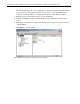
2. Open Cluster Administrator by clicking Start à Programs à Administrative Tools à
Cluster Administrator. A window will pop up prompting to open a connection to a cluster.
3. Select Create a new cluster in the Action field.
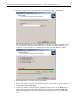
4. Click OK. The New Server Cluster Wizard will start. Click Next to continue.
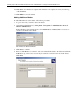
5. Enter the domain and name of the cluster. Click Next.