
HP ProLiant DL585 Generation 6 Server Maintenance and Service Guide


Removal and replacement procedures 55
To replace the component, reverse the removal procedure.
Power supply backplane
1. Power down the server (on page 25).
2. Remove the server from the rack (on page 27).
3. Remove the access panel ("Removing the access panel" on page 27).
4. Remove all hot-plug power supplies ("Power supply" on page 44).
5. Remove fans 3 through 6 installed in front of the power supply cages ("Fan locations" on page 80).
6. Remove all expansion boards ("Expansion boards" on page 47).
7. Remove all expansion slot covers ("Expansion slot covers" on page 46).
8. Remove the pass-through board ("Pass-through board" on page 49).
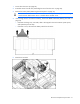
9. Remove the system cage ("System cage" on page 54).
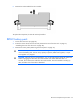
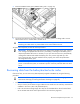
10. Turn the system cage over and place it on a level surface.