
HP ProLiant DL585 Generation 5 Server User Guide

Troubleshooting 69
Service notifications
To view the latest service notifications, refer to the HP website (http://www.hp.com/go/bizsupport).
Select the appropriate server model, and then click the Troubleshoot a Problem link on the product page.
Troubleshooting flowcharts
To effectively troubleshoot a problem, HP recommends that you start with the first flowchart in this section,
"Start diagnosis flowchart (on page 69)," and follow the appropriate diagnostic path. If the other
flowcharts do not provide a troubleshooting solution, follow the diagnostic steps in "General diagnosis
flowchart (on page 70)." The General diagnosis flowchart is a generic troubleshooting process to be used
when the problem is not server-specific or is not easily categorized into the other flowcharts.
The available flowcharts include:
• Start diagnosis flowchart (on page 69)
• General diagnosis flowchart (on page 70)
• Server power-on problems flowchart (on page 72)
• POST problems flowchart (on page 75)
• OS boot problems flowchart (on page 76)
• Server fault indications flowchart (on page 78)
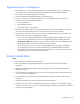
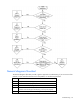
Start diagnosis flowchart
Use the following flowchart to start the diagnostic process.
Item Refer to
1 "General diagnosis flowchart (on page 70)"
2 "Power-on problems flowchart ("Server power-on problems flowchart"
on page 72)"
3 "POST problems flowchart (on page 75)"
4 "OS boot problems flowchart (on page 76)"
5 "Server fault indications flowchart (on page 78)"