
HP ProLiant DL585 Generation 5 Server User Guide

Hardware options installation 45
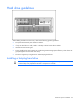
Hot-plug power supplies
The server supports a second hot-plug power supply to provide redundant power to the system in the
event of a failure in the primary power supply. You can install or replace a second hot-plug power supply
without powering down the server.
WARNING: To reduce the risk of electric shock or damage to the equipment:
• Do not disable the power cord grounding plug. The grounding plug is an important safety
feature.
• Plug the power cord into a grounded (earthed) electrical outlet that is easily accessible at
all times.
• Unplug the power cord from the power supply to disconnect power to the equipment.
• Do not route the power cord where it can be walked on or pinched by items placed
against it. Pay particular attention to the plug, electrical outlet, and the point where the
cord extends from the server.
CAUTION: If only one power supply is installed, do not remove the power supply unless the
server has been powered down. Removing the only operational power supply will cause an
immediate power loss.
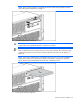
NOTE: If you remove or replace the primary hot-plug power supply, use the T-15 Torx
screwdriver provided with the server to remove the shipping screw. It is located just under the
port-colored plastic handle of the power supply unit.
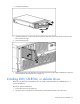
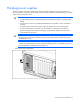
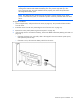
1. Remove the power supply blank.