
HP ProLiant DL585 Generation 5 Server User Guide

Operations 30
• Do not place tools or metal parts on top of batteries.
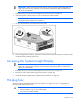
To replace a hot-plug fan:
1. Extend the server from the rack ("Extending the server from the rack" on page 27).
2. Remove the access panel ("Removing the access panel" on page 28).
3. Identify the failed fan by locating an amber LED on top of the failed fan ("Hot-plug fan LEDs" on
page 20) or on the Systems Insight Display ("Systems Insight Display LEDs" on page 16).
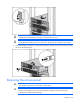
4. Remove the malfunctioning hot-plug fan from the server.
IMPORTANT: Remove and replace one fan at a time. If the system detects two fan failures,
the server shuts down to avoid thermal damage.
5. Install a new hot-plug fan.
6. Observe the LED on each installed fan to be sure it is illuminated green ("Hot-plug fan LEDs" on
page 20).
NOTE: If the front panel internal system health LED is not green after you install hot-plug fans,
reseat the hot-plug fan or refer to the troubleshooting section.
7. Replace the access panel ("Removing the access panel" on page 28).
8. Slide the server into the rack.
Removing the system battery
If the server no longer automatically displays the correct date and time, you may need to replace the
battery that provides power to the real-time clock. Under normal use, battery life is 5 to 10 years.
WARNING: The computer contains an internal lithium manganese dioxide, a vanadium
pentoxide, or an alkaline battery pack. A risk of fire and burns exists if the battery pack is not
properly handled. To reduce the risk of personal injury:
• Do not attempt to recharge the battery.
• Do not expose the battery to temperatures higher than 60°C (140°F).